Conversational Agent Design: 6 UX Decisions That Drove 35.2% Efficiency Gains (Side Panel)
35.2%
Improvement in Order Completion
45.4%
Decrease in Dependency
press to go back home
use ← → arrow keys
or click the arrows
jump to any section
prefer reading?
view written case studyMy Role
Designing an AI agent that meets lenders where they work
Role
Lead Product Designer
Responsibilities
Design feature from 0 → 1
Design the agent's conversation flows, tone, and fallback content
Collaborators
1 Product Manager, 1 Product Designer (Me), Software Engineers, QA
Timeline
2025
Business Goals
Grow revenue by 30%.
Ship AI feature to improve some aspect of client order workflow.
Reduce customer support overhead.
My Role
Managing across four layers
Clients
I was involved with clients at every stage of the journey, from early product discovery to understand their workflows and pain points, through user testing and iteration on the design solution, to gathering feedback post-launch to inform what to improve and build next.
Leadership
CEO · COO · Senior Vice President of Product · Senior Product Manager
I presented work regularly to align on direction, get sign-off on decisions, and navigate competing priorities across product and business goals.
My Team
Product Manager · Backend Engineers · QA
I worked closely with the team daily to scope features, validate technical feasibility, and ensure designs translated cleanly through to QA and release.
Other Departments
Marketing · Customer Success
I worked with both teams around launch, aligning on timing, messaging, and ensuring a smooth rollout across channels.
Problem
Managing appraisal orders means constantly switching between screens, digging through buried comments, and manually tracking dates. Critical details fall through the cracks.
Solution
An AI agent embedded in Direct lets lenders ask about any order in plain language and trust the answer, surfacing details and workflow priorities without leaving their current screen.
Meet Sarah. Sarah is a lender who has to manage 10 appraisal orders today. She has 20 tabs open, 10 sticky notes on her monitor, and one very important deadline she just missed because the update was buried in a comment on page 3.

Users
Appraisal lenders juggle dozens of live orders.
Missing a single update could mean a failed appraisal, a delayed closing, or a regulatory violation.
Problem
Tracking orders in the current system is slow, fragmented, and difficult
Lenders manage dozens of orders at a time, each buried in dense detail pages with no clear priority. Finding and acting on relevant information means digging through filters, scrolling past noise, and opening orders one by one.
The current set up...
1. Had a huge list of filters.
2. Really long order pages where information would get lost
3. Some info buried under second and third clicks
ux insight
Cognitive Overload
Working memory holds roughly four items at a time.1 When an interface exceeds that, the added cognitive load increases the chance users overlook or mismanage information.
Dense order pages with buried filters and multi-click navigation force lenders to maintain a mental model across scrolls and tabs. Every extra step adds friction that compounds into fatigue.2
1 The Magical Number 4 in Short-Term Memory, Cowan, Behavioral and Brain Sciences (2001)
2 Information Scent: How Users Decide Where to Go Next, Nielsen Norman Group
Problem
Listening to lenders to understand where the friction lived
I kept a close eye on Microsoft Clarity to note user behavior, and led user interviews to identify friction points and define what lenders actually need from an AI assistant in their daily workflow.
I have to open multiple tabs just to cross-reference order details and deadlines.

I rely on memory and sticky notes to track which orders still need follow-up.
I end up calling PMs just to get status updates that are already somewhere in the system.
Pushback
Leadership wanted a summary box. I wanted something that earned its place in the workflow
Leadership's initial ask was an AI summary panel on the order page. I took that brief, stress-tested it against what lenders had told me, and presented a rationale for a more integrated approach that the team aligned on.
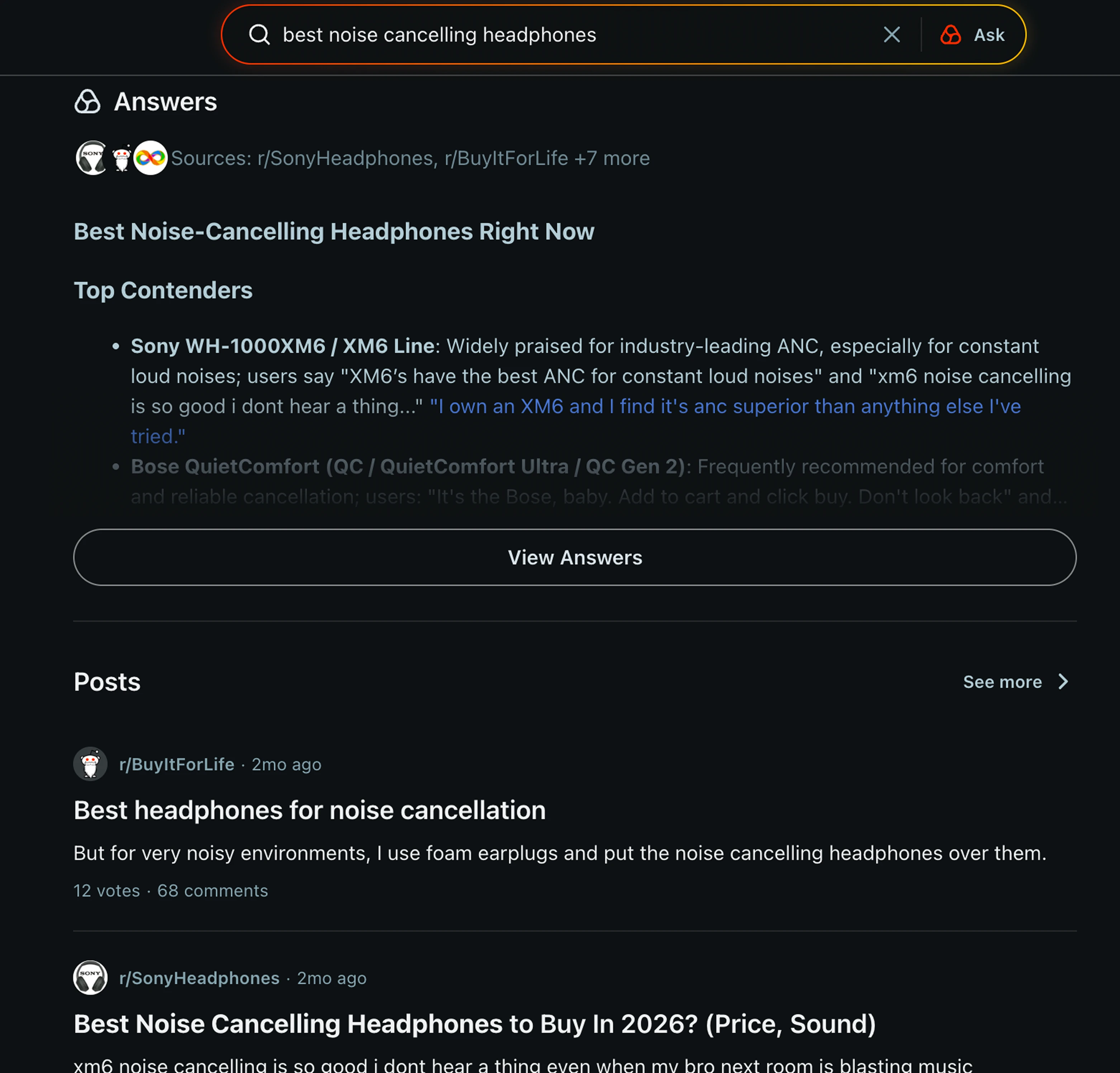
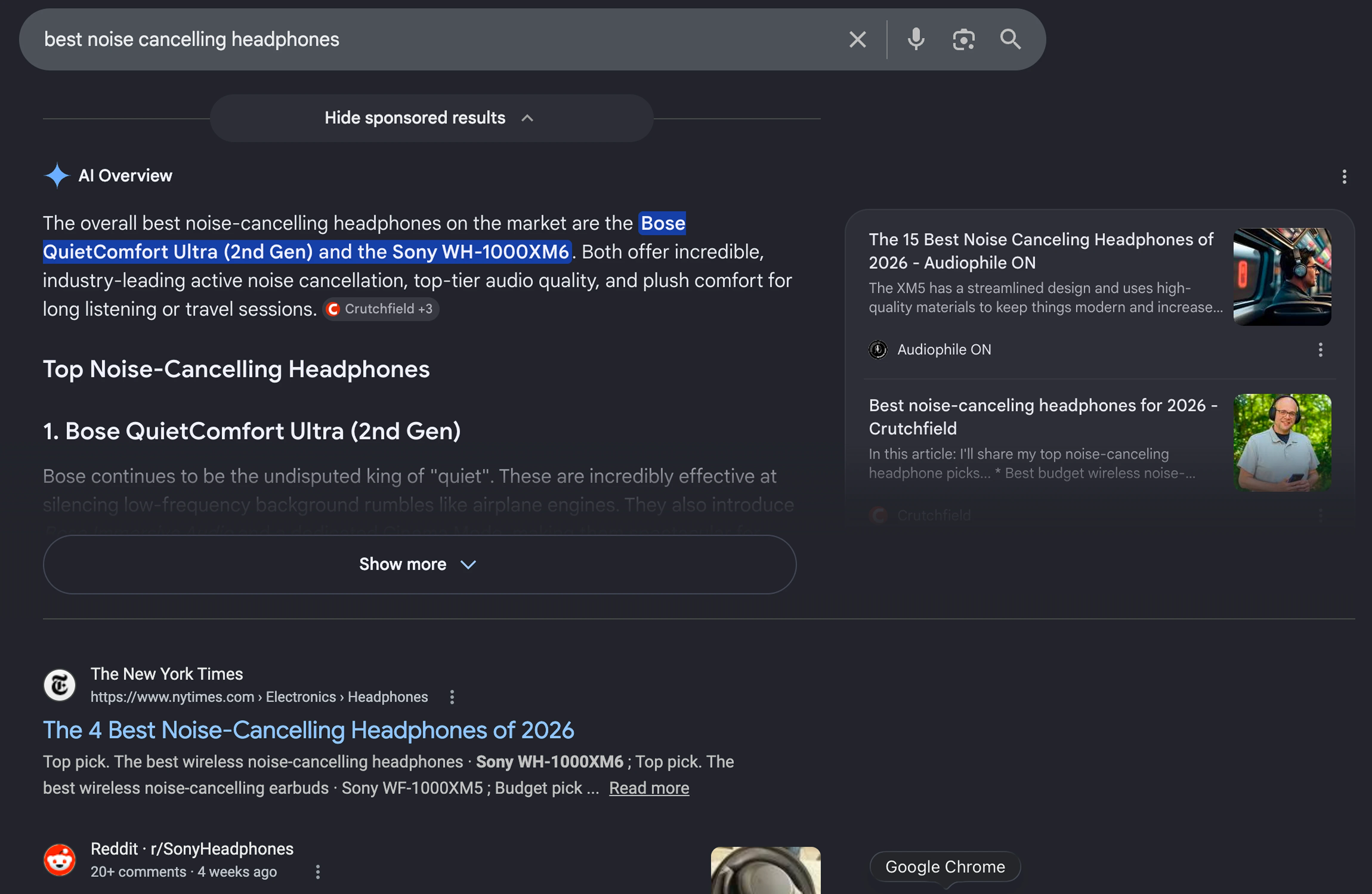
Many platforms show AI summaries nowadays


True. Just look at Reddit and Chrome...
Pushback
Summarizing many sources is useful. Summarizing one source is not
A summary box solves a discovery problem when the source material is scattered. But lenders also need to act, not just find. Pulling the same order data into a static box above the page neither surfaces anything new nor speeds up what happens next.
Pushback
I built what leadership asked for, then showed them what it was missing
I built a prototype of the proposed solution so the team could see what it would actually feel like to use. That shifted the conversation from whether it was a good idea to how it should work.
It's a good start, but it doesn't solve the problem.
UX Decisions
UX Decision 1 Designing the agent's voice before the interface
Process language, not human language
It says "Searching order comments" or "Checking deadline," never "I think" or "I feel." It's a tool doing a job, not a colleague with opinions.
Precise over friendly
No filler enthusiasm or small talk. Lenders are skimming under pressure, so every extra word costs them time.
Always names its source
Every claim ties back to a specific order, comment, or document, not a bare assertion.
Consistent everywhere it appears
Same tone whether it's embedded in the order page, dashboard, or a document view. One voice, many surfaces.
UX Decisions
UX Decision 2 Put the agent everywhere, not just the order page
Before
User stops workflow, navigates to order details, finds info, loses context.
After
Agent panel opens inline wherever the user already is. Context stays intact.
ux insight
Context Switching Cost
Every time a user leaves their task to search for information, they pay a switching cost. Research shows reorienting attention after an interruption can take significantly longer than the interruption itself.1
Embedding help at the point of need keeps users in their task. In-context support preserves continuity and reduces disruption compared to pulling users into separate flows.2
1 The Cost of Interrupted Work: More Speed and Stress, Mark et al., ACM CHI (2008)
2 Onboarding Tutorials vs. Contextual Help, Nielsen Norman Group
UX Decisions
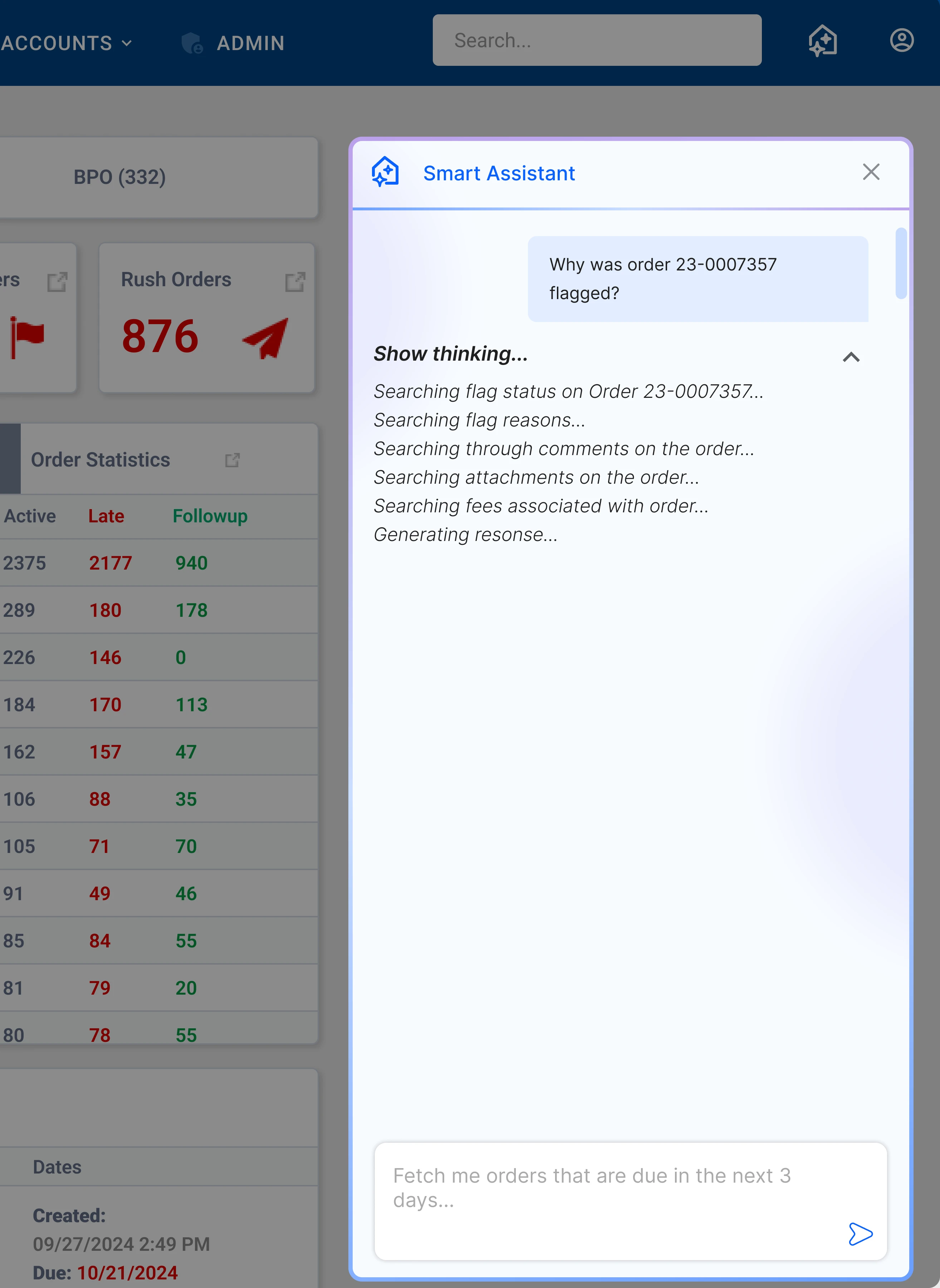
UX Decision 3 Show the agent thinking out loud
Trust Signal
By showing the agent's reasoning process, users can see exactly what it's searching for and how it arrived at an answer. It reads "Checking deadlines on ORD-1182…" then "Reviewing comment history…," never "Thinking…"
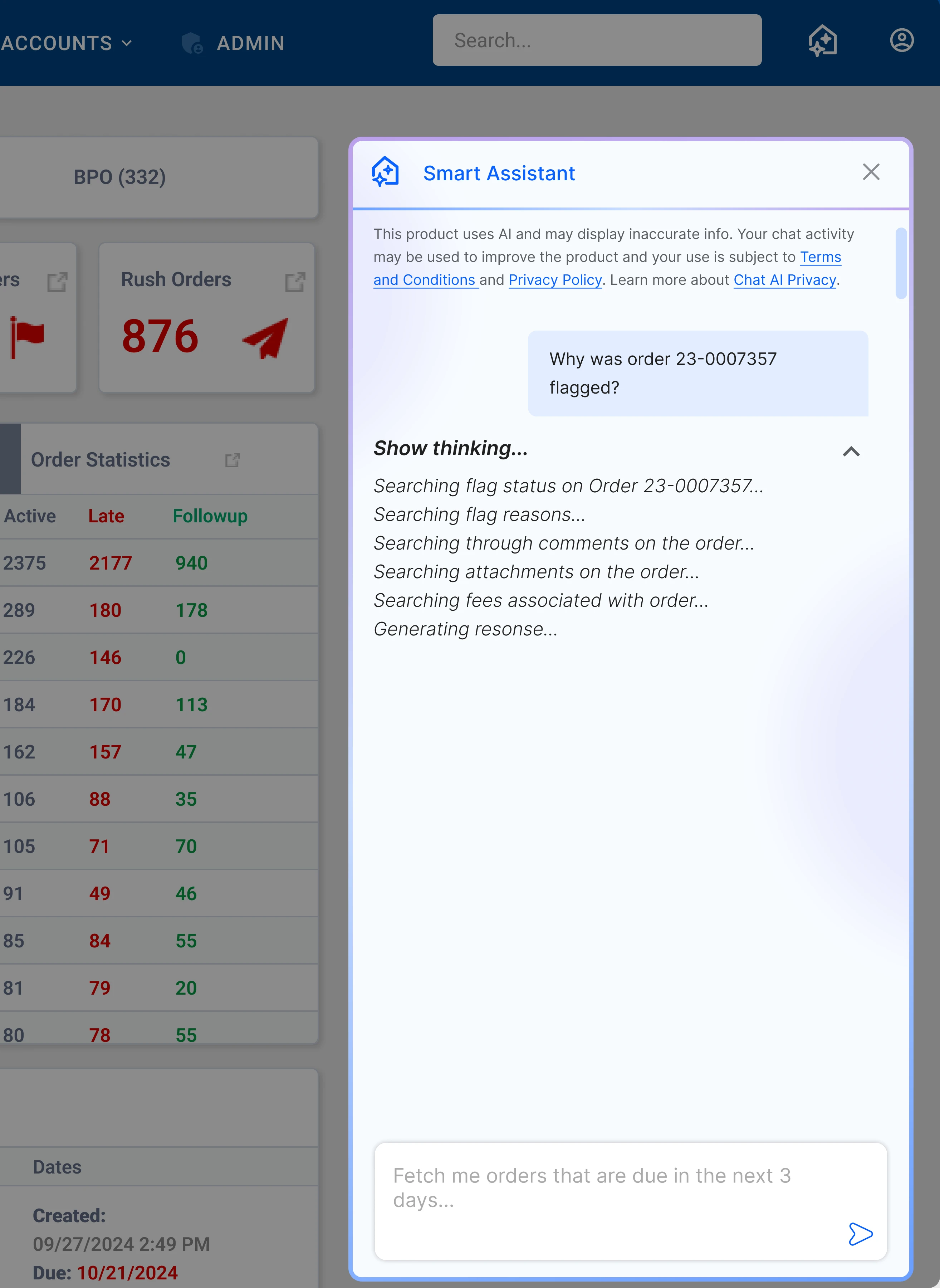
This transparency builds confidence that the agent is grounded in real data, not guessing.
UX Decisions
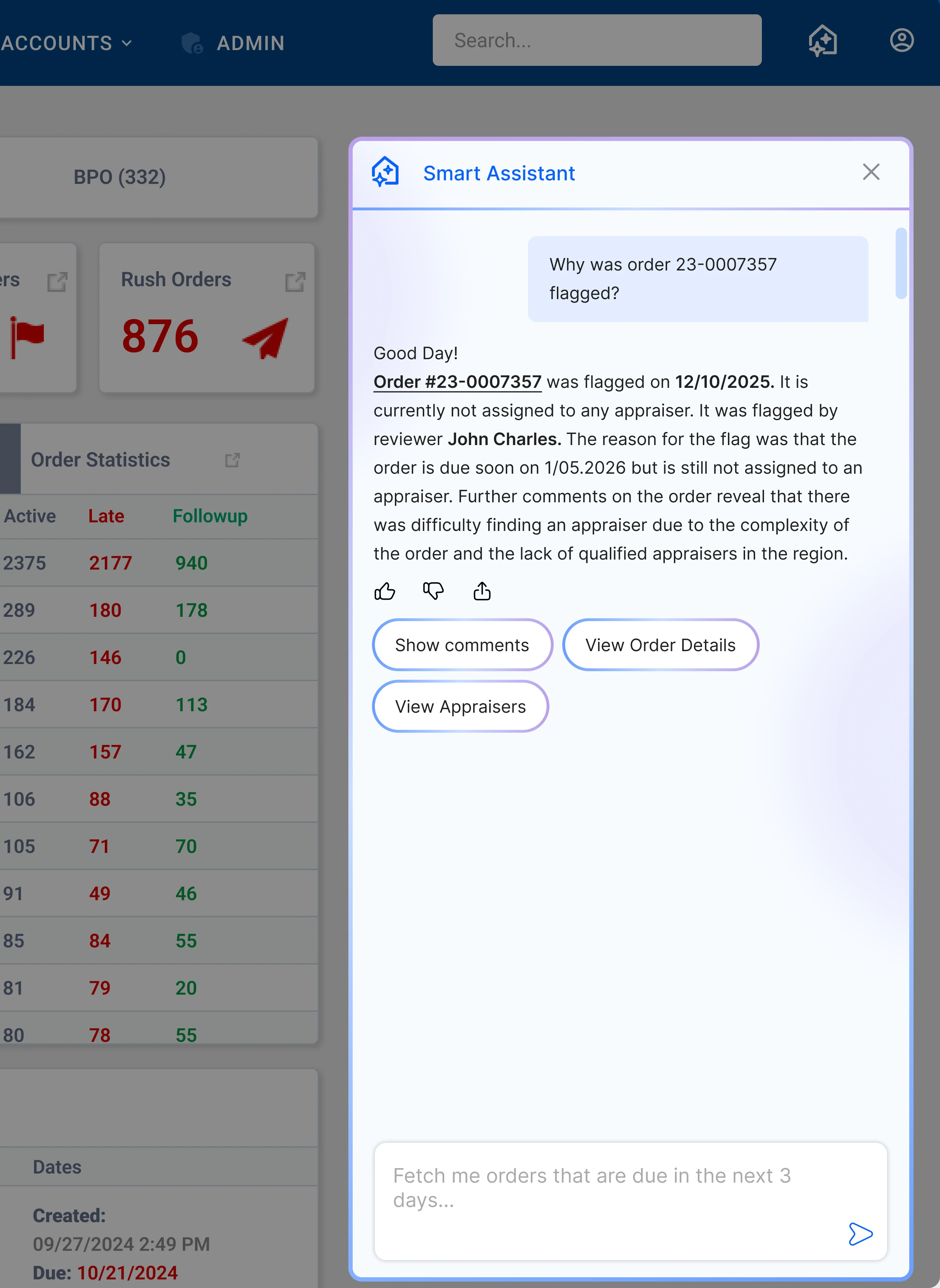
UX Decision 4 Show where agent finds its information from
The agent cites where it pulled information from (example, the comments), formatted as "Source: Comment on ORD-1182, June 3." Users see the agent is grounded in real data.
Users can verify the agent's information by clicking the order number. Each accurate result reinforces confidence, growing reliance and trust over time.
UX Decisions
UX Decision 5 Suggesting next steps
Reduce decision fatigue
Instead of asking "what do I do next?", the agent surfaces the most relevant action as a single suggested chip, like "Notify vendor of missing document," based on the order's current state.
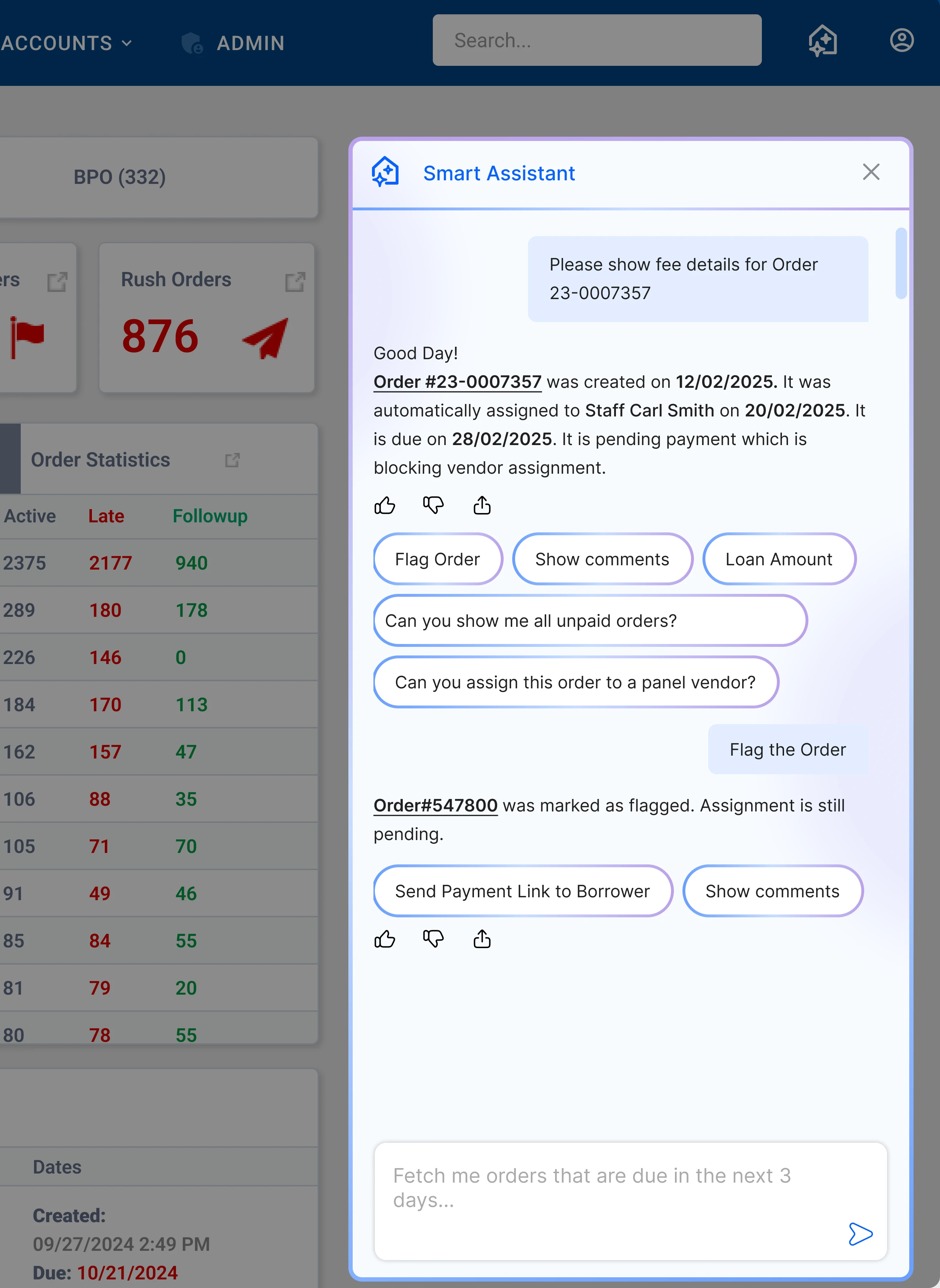
Keep users in flow
Suggested actions keep lenders moving through their workflow without breaking context or navigating away.
UX Decisions
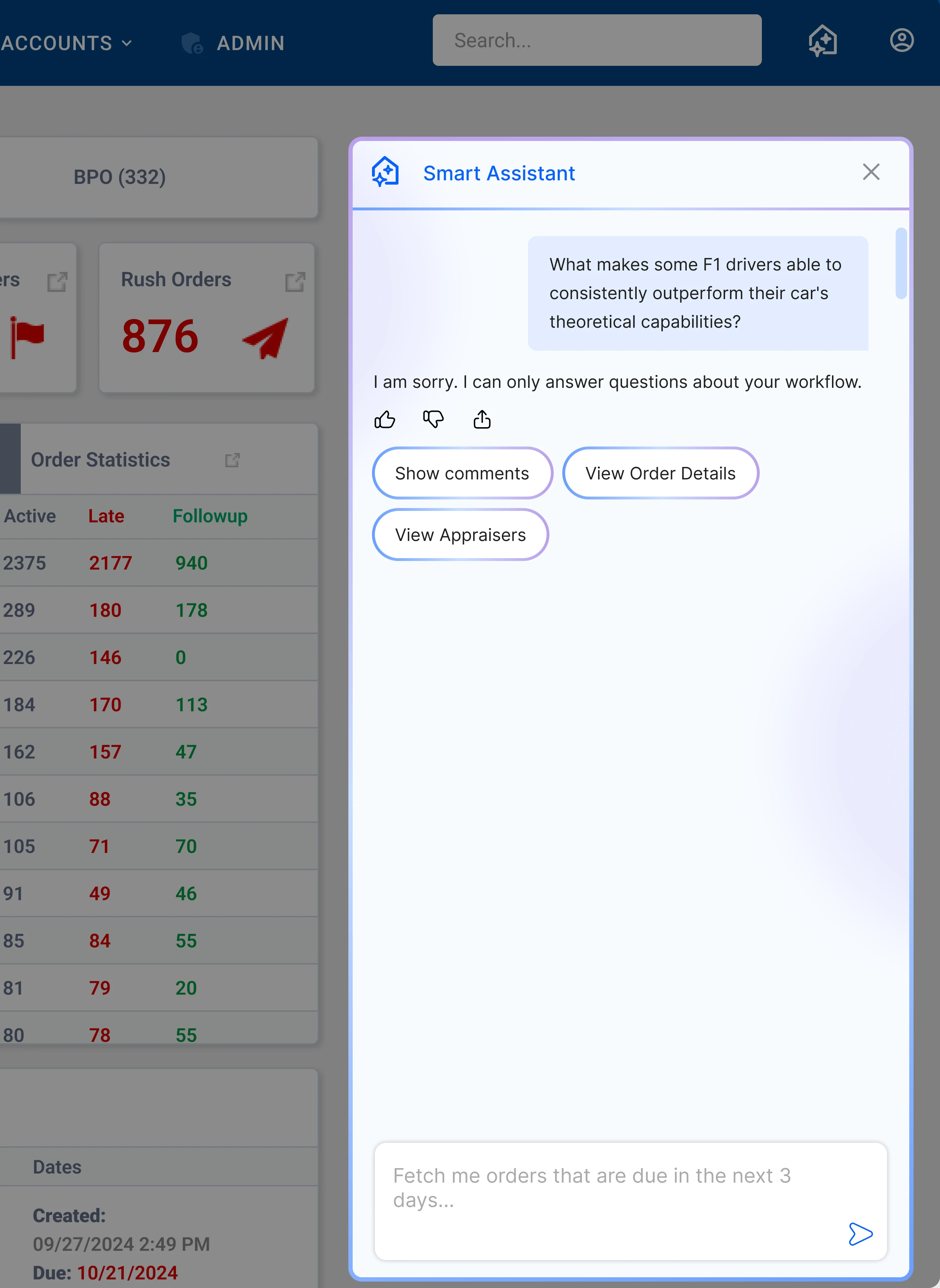
UX Decision 6 When the agent doesn't know
What it says
I couldn't find that in ORD-1182. Try rephrasing, or ask about a specific document or comment.
Ground rules
Names the gap, never blames the question or claims an answer it doesn't have.
Always offers a next step: a rephrase suggestion, or a link back to the order for manual lookup.
Lets a lender rephrase in the same thread instead of restarting the conversation.
Final Designs
Final designs
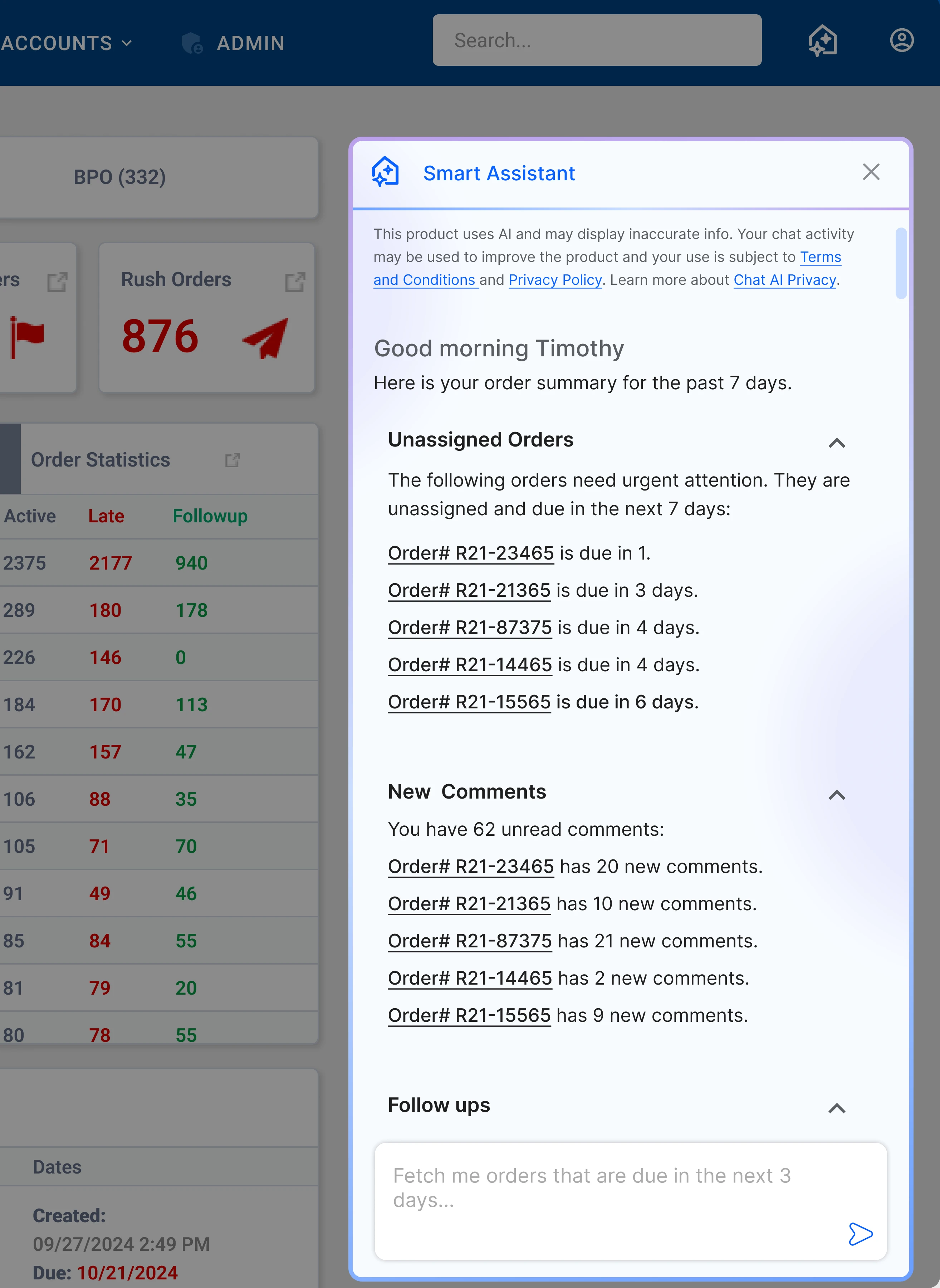
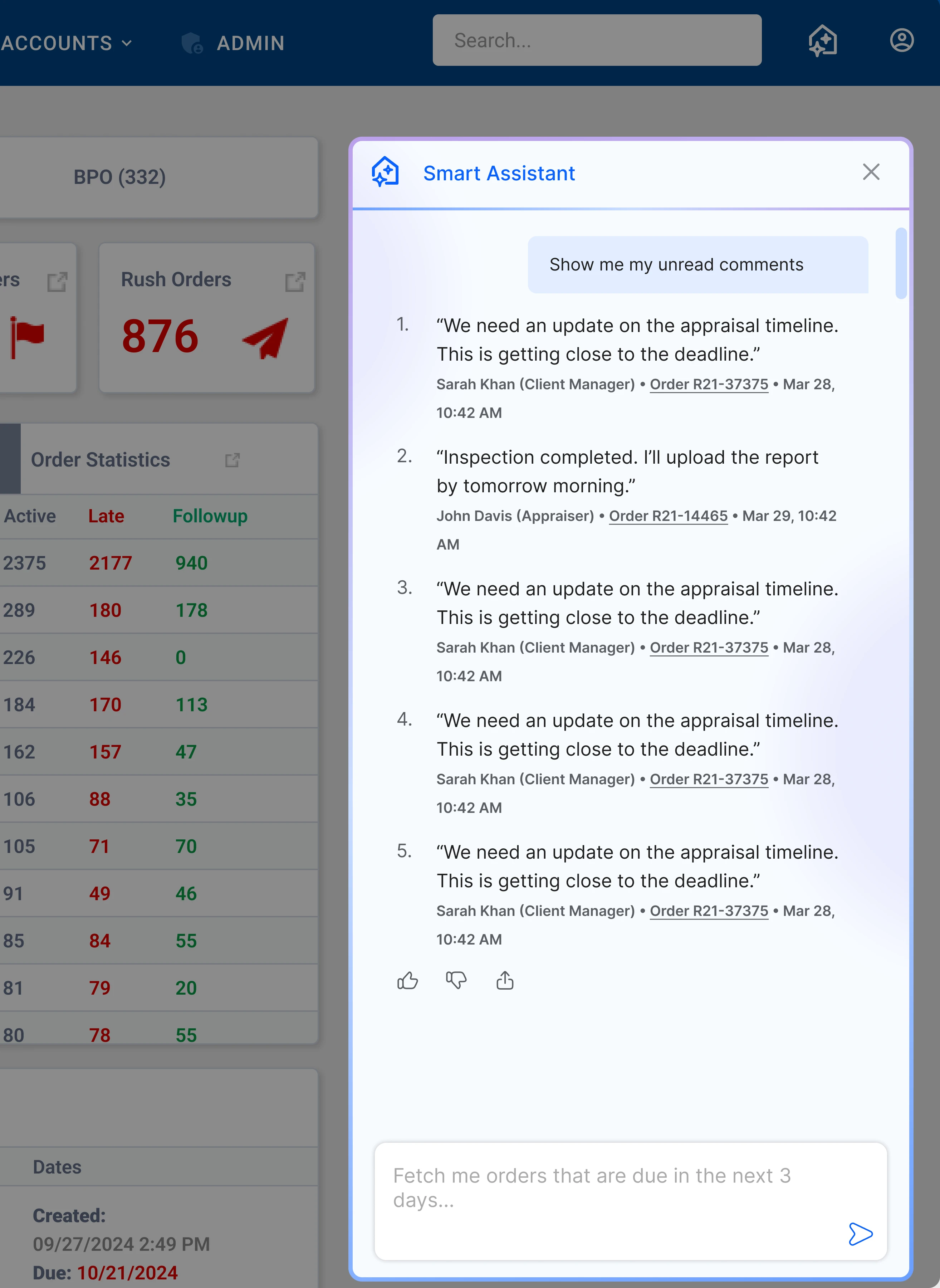
Response chunking, inline citations, and suggested-action chips carried the same voice principles through to the shipped product.
Testing and Feedback
Putting it to the test
To ensure accuracy and usefulness in a high-stakes B2B environment, the agent was initially rolled out to a small group of clients rather than a full-scale launch. This allowed us to validate performance in real workflows while minimizing risk. It was then gradually rolled out to more clients after validation.
Rollout approach
How I monitored
I closely monitored Microsoft Clarity, Hotjar, and Mixpanel to analyze user engagement with the agent. I also sat down with clients to see what they had to say. This helped me improve responses.
Testing and Feedback
Improving conversations and responses
I learned that when users wanted to know information about orders, they also wanted the agent to link the attached documents for that order in the chat, so that users don't have to look for it themselves and can just download it through the agent.
I also trimmed response length after watching lenders skim on calls. Early responses read like full paragraphs; shorter, chunked responses with the answer first tested better for a user reading fast, mid-conversation.
Testing and Feedback
User Feedback
We love using the chat that you guys have come out with. It makes order processing so much faster for us.
— ValueLink Client
User Impact
How it changed Sarah's workflow
Before I had to constantly switch between tabs. Now, the agent gives me a centralized overview of orders due soon, so I don't have to jump between screens.
Before I tracked follow-ups manually. Now, it highlights orders that need attention so I can act without mentally tracking everything.
Before I kept losing track of my overall workload. Now, it gives me a quick summary of orders so I always know where things stand.

Before I had to rely on customer support for updates. Now, the agent instantly surfaces order statuses, reducing back-and-forth.
Before I had to read comments order by order. Now, it aggregates unread comments across orders so I can review everything in one place.
Before I kept breaking my workflow to find information. Now, the agent is embedded throughout Direct so I can access anything from anywhere.
Results
What I Learned
Think in systems
This required me to think in systems. The real complexity was in structuring modular services for user intent, order retrieval, and action execution (like performing actions within specific orders).
What I want to improve on
I want to give the agent the ability to answer questions about the constantly changing government regulations around appraisals and what it means for the user.
I'd also like to mature the conversation design further: a wider range of fallback responses so repeated misses don't feel repetitive, and testing whether the current voice still holds up as the agent takes on more complex, multi-step requests.
Metrics
35.2%
Improvement in order completion
Drove a 35.2% reduction in order delays as noted by Mixpanel.
45.4%
Decrease in dependency
Decreased user dependency on Customer Success by 45.4%, freeing up Customer Success for other tasks and giving users more agency.